
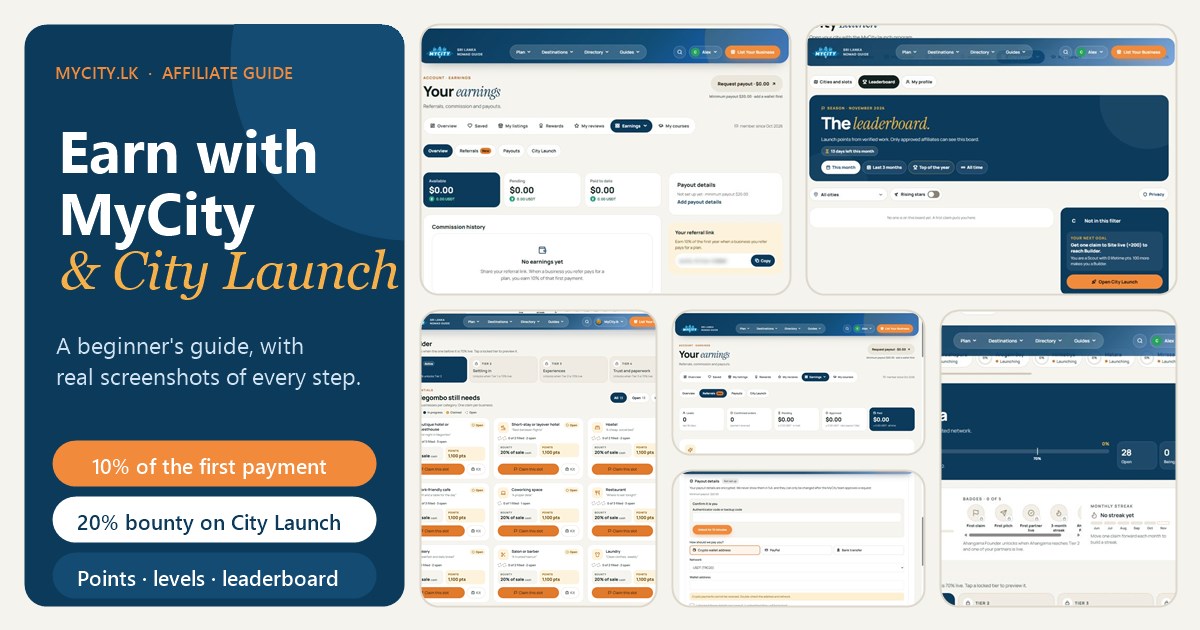
MyCity.lk is an invite-only guide and directory for digital nomads in Sri Lanka. The MyCity affiliate program lets you earn money by introducing local businesses to MyCity. City Launch is the part of the program where you help open a whole town, one business type at a time. This guide explains both from zero, with screenshots of the real screens.
What is in this guide
- What the affiliate program is
- Who it is for
- How to apply and get approved
- Where to find your referral link
- How commission works and when you are paid
- How to set up and request a payout
- The Earnings pages: Overview, Referrals, Payouts
- The promo kit and creatives
- What City Launch is
- Cities, tiers and how they unlock
- How to claim a business, and the claim rules
- Points, levels and what they are for
- The leaderboard, your profile and privacy
- Quick answers (FAQ)
- Your first week checklist
What the affiliate program is
You introduce a business to MyCity. If that business buys something through your link or code (a website, SEO, social media, or a listing plan), MyCity pays you a commission. You are an independent promoter, not an employee.
There are two ways to earn:
- Referral commission. Share your link or code. When the business pays, you earn 10% of that first payment.
- City Launch. Claim a specific business in a launching city, pitch it, and move it forward until it goes live. You earn points along the way and a cash bounty of 20% of the sale once the business has paid.
Who it is for
It suits anyone who knows or meets local businesses, or who has an audience that trusts them:
- Content creators. Bloggers, YouTubers, Instagram and TikTok creators who share Sri Lanka travel and nomad content. Put your link and code in your captions and use the ready-made creatives.
- Backpackers. Travellers who stay in hostels, cafes and guesthouses and can recommend, or introduce, the places they love.
- Digital nomads. People who live in a town for weeks or months and know who is good: the cafe, the coworking space, the scooter rental.
- Locals and local professionals. Regulars at a business, friends of guesthouse owners, tour guides and drivers.
You must be at least 18, give true details, and promote honestly (no false promises about prices, results or rankings, and no spam). The full rules are in the Affiliate Terms. Please read them before you apply.
How to apply and get approved
- Go to the affiliate application form (log in or create your MyCity account first if it asks). It takes about two minutes.
- Tell us a little about yourself, give your WhatsApp number with country code, and explain how you will find businesses to refer.
- Accept the Affiliate Terms and send the application.
- The MyCity team reviews every application by hand. Nothing is approved automatically, and MyCity does not have to give a reason if an application is declined. You get an email with the decision.
- If you are not approved, you can apply again after 30 days.
Only approved affiliates see the Earnings and City Launch tabs in their account.
Where to find your referral link
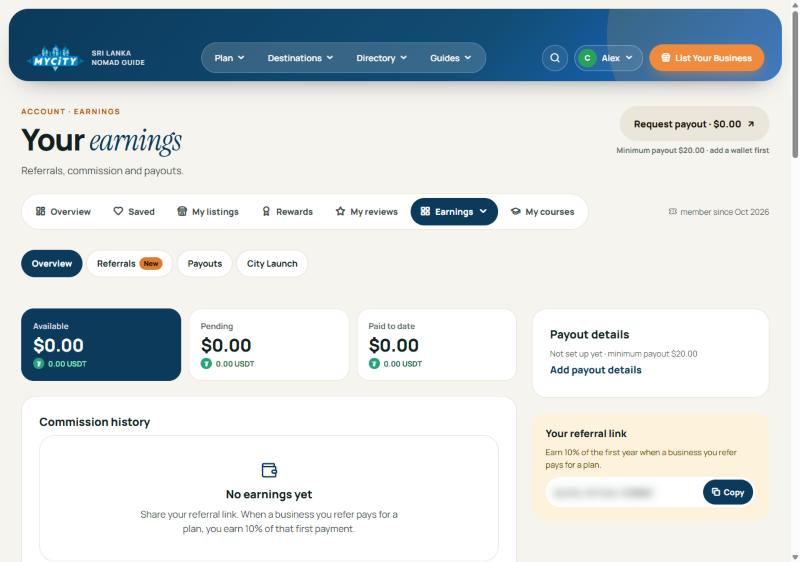
Go to Account → Earnings → Overview. The “Your referral link” box on the right shows your personal link with a Copy button (we have hidden ours in the screenshot). For a link to one specific package, use the Share kit on the Referrals page (see The Earnings pages, below). Every link carries your personal code, so share it on purpose.
How commission works and when you are paid
- The payment is confirmed. Commission is created only when the customer’s bank transfer or USDT payment actually arrives.
- 14-day hold. The commission shows as Pending for 14 days while the order starts, in case of a refund or cancellation.
- Approved. After the hold it becomes Available.
- Monthly payout. Approved commission is paid on the 1st of the month, once you have reached the minimum payout.
The 10% is calculated on the first payment the business makes for the plan you referred. Your balance is split into three cards: Available (ready to be paid), Pending (still in the hold) and Paid to date. Each card also shows the amount in USDT. A refunded, cancelled or fraudulent order can be reversed or held, and referring yourself is not allowed.
How to set up and request a payout
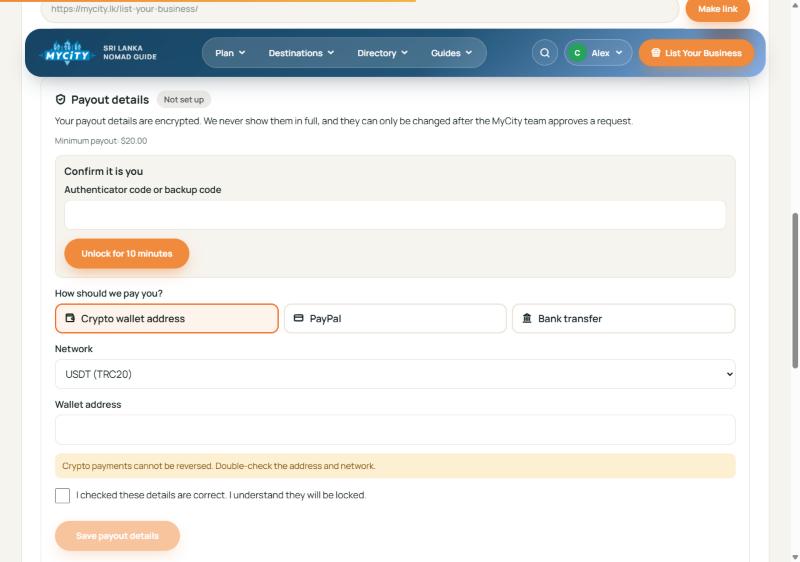
- On the Earnings Overview, click Add payout details (or open the Payouts page).
- Confirm it is you. Enter your authenticator code (or a backup code) to unlock the form for 10 minutes.
- Choose how you want to be paid: a crypto wallet (USDT), PayPal, or a bank transfer. For a wallet, pick the right network. Crypto payments cannot be reversed, so double-check the address.
- Tick the box to confirm the details are correct and save. They are encrypted and then locked.
- When your Available balance reaches the minimum payout of $20, use the Request payout button at the top right of the Earnings page.
Why are my details locked? It protects you if someone gets into your account. To change them, send a change request from the Payouts page. The MyCity team has to approve it and may ask for proof. A payout always goes to the details that were locked when you asked for it. Bank payouts are in US dollars, and your bank may charge a fee.
The Earnings pages
Under Account → Earnings you will see four small tabs just under the main menu: Overview, Referrals, Payouts and City Launch.
- Overview. Your three balance cards, your commission history (each line shows Pending, Available, Payout requested, Paid or Void), your payout details status and your referral link.
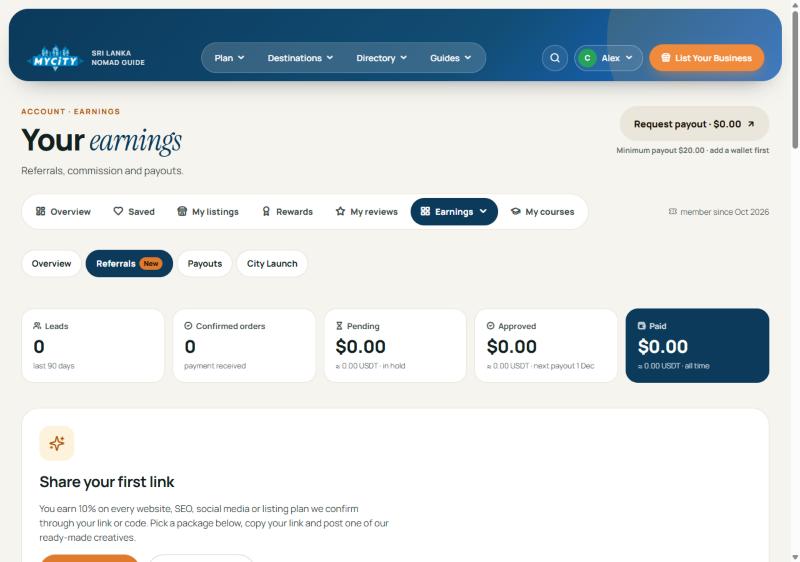
- Referrals. Five numbers at the top: Leads (last 90 days), Confirmed orders, Pending, Approved and Paid. Below that, a “How commission works” summary, a table of everyone you referred (customer, item, type, date, status and commission), the Share kit and the Creatives library. A lead moves from Quoted to Confirmed to Completed. A Cancelled order has its commission crossed out.
- Payouts. Where you add your payout details, ask for a change, and request a payout.
- City Launch. Takes you to the City Launch area (sections 9 to 13).
The promo kit and creatives
You do not have to design anything. On Earnings → Referrals:
- Share kit. Pick a package to promote. You get a share link and a referral code, each with a Copy button, plus Share and WhatsApp buttons.
- Creatives library. Ads, posts, stories and videos made by MyCity, free to use. Filter by format, and use “Download all” to take the set. Always put your link and code in the caption. The “Copy caption” button adds them for you.
- City Launch pitch kit. Ready-made scripts for WhatsApp, an Instagram or Facebook message, and email, plus short answers to common objections such as “I already have Facebook”, “Too expensive” and “I’m too busy”. The scripts fill in the business, city and category for you.
Use only MyCity’s approved creatives and scripts, or your own words if they are true and say the same thing.
What City Launch is
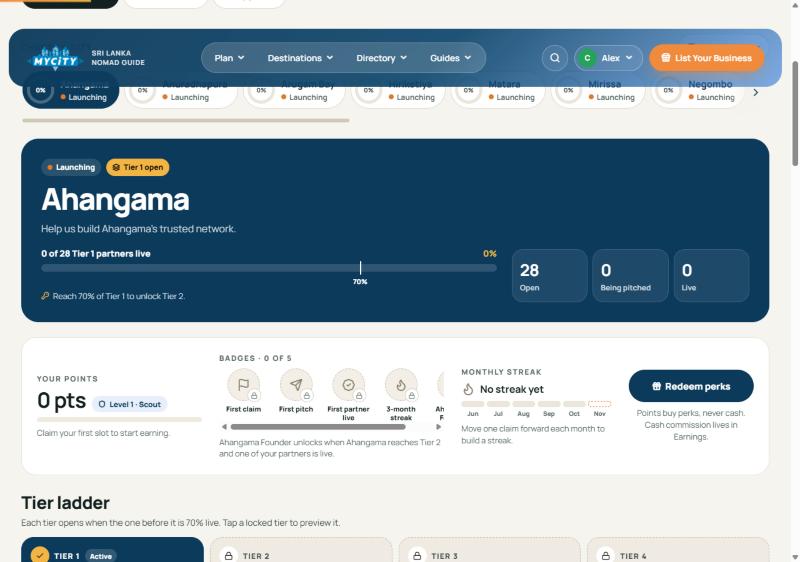
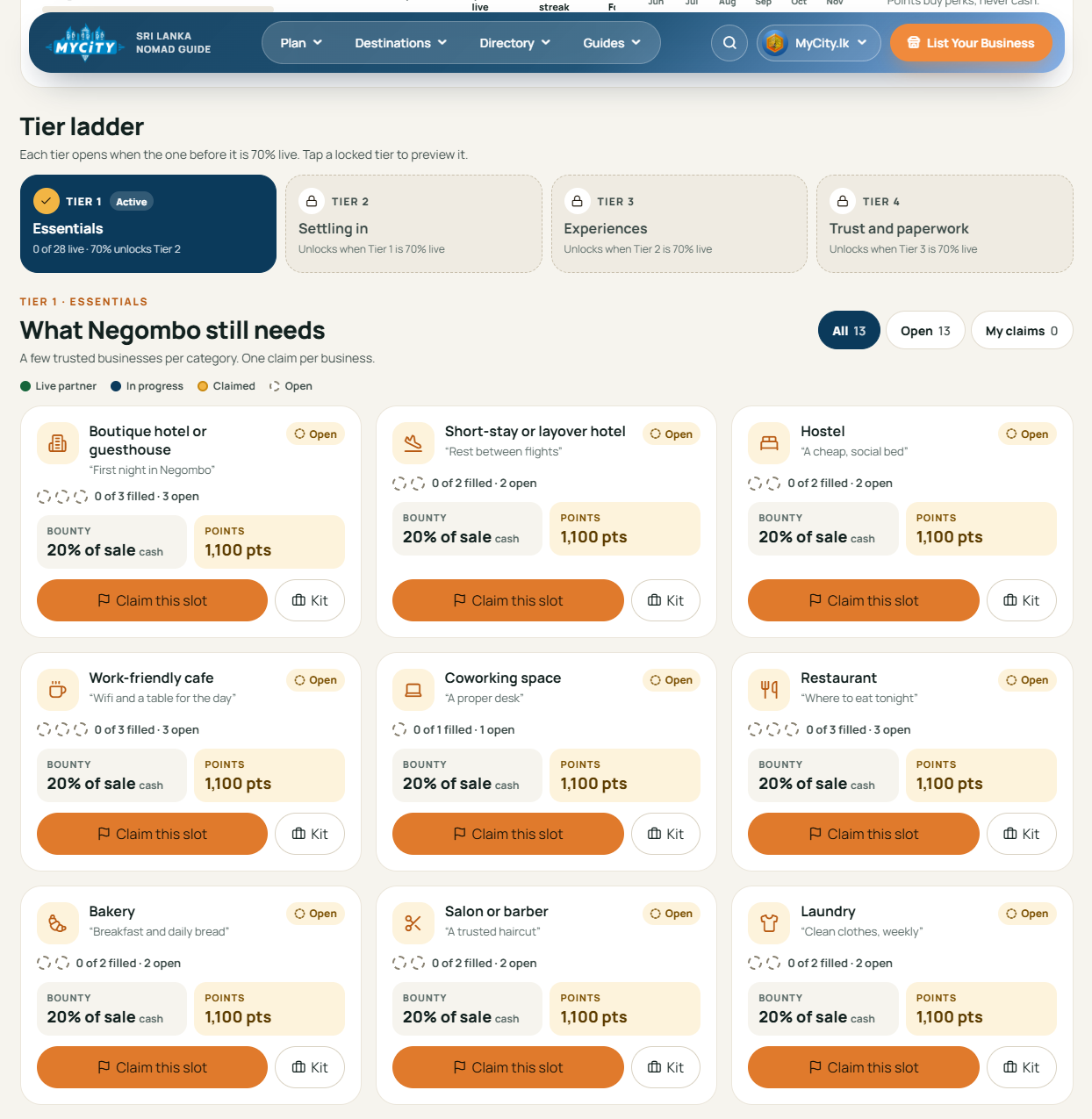
City Launch is how MyCity opens a town. In each city, MyCity picks a small number of trusted businesses per category (for example, 3 boutique hotels, 3 restaurants, 1 coworking space). You find and sign up those businesses. A city page shows every category, how many slots there are, and how many are open, being pitched or live.
Open it from Account → City Launch. The tabs there are Cities and slots, Leaderboard and My profile. At the top you choose a city. Cities currently launching include Negombo, Ahangama, Mirissa, Weligama, Matara, Hiriketiya, Arugam Bay, Ella, Galle, Kandy, Colombo, Sigiriya, Anuradhapura, Trincomalee, Nuwara Eliya, and Yala and Tissamaharama. The city page also shows your points, badges and monthly streak.
Cities, tiers and how they unlock
Business types are grouped into four tiers. Tier 1 is open from day one. The next tier opens in a city only when 70% of the previous tier’s slots in that city are live.
| Tier | Name | What it covers |
|---|---|---|
| 1 | Essentials | What anyone needs in their first week in town (hotels, cafes, restaurants, transfers, scooter rental, gyms and more) |
| 2 | Settling in | Everyday services for people who stay a while (spas, tailors, repairs, long-term rentals and more) |
| 3 | Experiences | Tours, classes and things to do |
| 4 | Trust and paperwork | Advisers and venues people need to trust (visa agents, lawyers, accountants, event venues) |
A locked tier shows as locked and cannot be claimed yet. Some categories (such as pharmacy and grocery) are handled by the MyCity team and cannot be claimed.
How to claim a business, and the claim rules
Each slot card shows the cash bounty (20% of the sale) and the points on offer (1,100 points for a business that goes all the way to Listed), with a Claim this slot button and a Kit button that opens the pitch scripts. A claim reserves one business for you so nobody else pitches it at the same time. To claim, choose a city and an open slot in a category, then enter the business name, its area, a phone or WhatsApp number we can reach, and how you know them (for example “I know the owner” or “I am a regular customer”). Only give details you got honestly, and use them only to tell that business about MyCity.
The stages. You move your own claim forward through Claimed → Pitched → Interested. MyCity then updates the later stages: Paid → Site live → Listed. A claim can only move forward.
The rules:
- A claim lasts 14 days. Any move to the next stage restarts the 14 days. When it runs out with no progress, the claim is released and the slot opens again. You get an email, and a red “ends in N days” warning shows in the last 3 days.
- You can hold at most 3 active claims at once (Claimed, Pitched or Interested).
- Only one affiliate can hold a business at a time. The same phone number cannot be claimed twice.
- You can hold only one claim per category in a city.
- Other affiliates cannot see your claims. They only see how many slots are open.
- MyCity can release any claim, for example if it is inactive or breaks the terms.
Cash bounty. When a claimed business has paid and its order is confirmed, you earn a cash bounty. The bounty is 20% of the sale. It is paid on top of the normal commission, goes through the same 14-day hold, and follows the same payout rules. You do not earn on your own purchase, and a released claim or cancelled order voids it.
Points, levels and what they are for
You earn City Launch points as a claim moves forward. Each stage pays once per city and category:
| What happens | Points |
|---|---|
| Claimed | 20 |
| Pitched | 30 |
| Interested | 50 |
| Paid | 300 |
| Site live | 200 |
| Listed | 500 |
| Slot bonus (your partner completes the last open slot of a category) | 250 |
| City unlock (a new tier opens in a city where you have a live partner) | 500 |
Points build your level: Scout (0), Builder (100), Connector (400), Anchor (1,000) and Pillar (2,500). If a claim is released after it was Paid, Site live or Listed, those points are taken back.
Important: points are for perks only. They buy perks, never cash, and cannot be exchanged for money. Cash comes only from commission and bounty. The perks catalogue is still being announced, so check the “Redeem perks” button on your City Launch page for what is available. Affiliates with a live partner when a city unlocks its second tier also earn a Founder badge for that city.
The leaderboard, your profile and privacy
The leaderboard ranks affiliates by Launch points from verified work. You can view it by This month, Last 3 months, Top of the year (the Affiliate of the Year race, 1 January to 31 December) and All time. Use the city filter, or switch on Rising stars to see newer affiliates only. All dates use Sri Lanka time. There are also badges, such as 4-week and 12-week streaks (at least one claim or stage update every week), Perfect Month and Podium Finish.
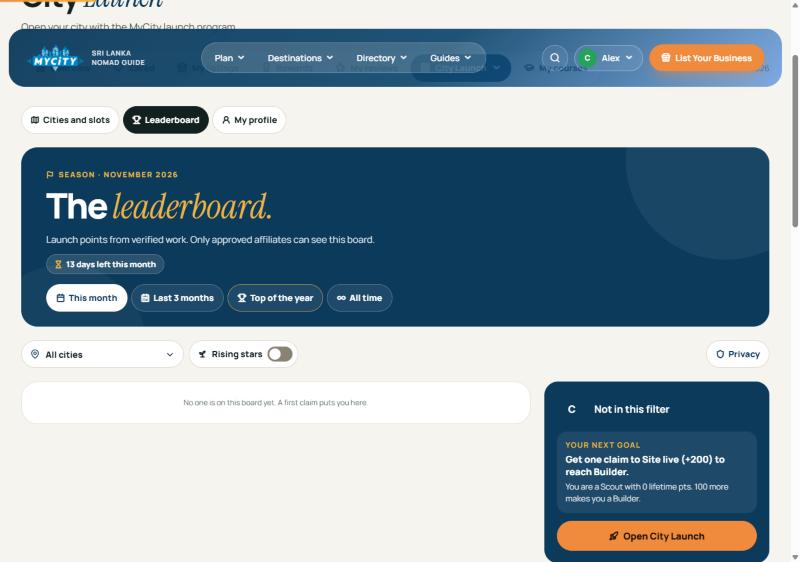
Your profile is under My profile. You can set a nickname (unique, and you can change it about once a month) and a short bio of up to 160 characters.
Privacy. Only other approved affiliates can see the board. It is not public and not on Google. By default you appear under a nickname (first name plus last initial). The first time you open the board you see a short notice, shown below. The Privacy button lets you switch off, separately: appearing on the leaderboard, your profile page, your social channels (off by default), your cities and categories (counts only), and your recent wins (lines like “Listed a restaurant in Negombo”, never business names).
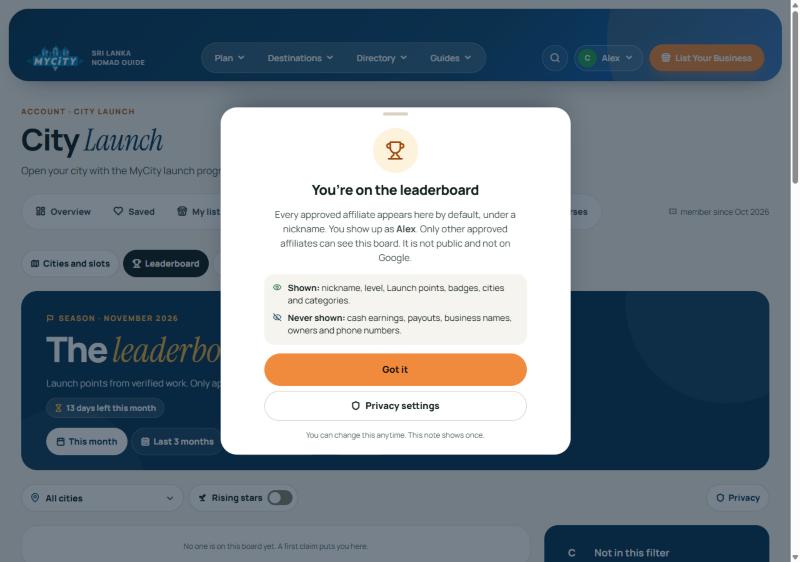
- Shown: nickname, level, Launch points, badges, cities and categories.
- Never shown: cash earnings, payouts, business names, owners and phone numbers.
If you hide yourself you still see your own private rank. Prizes go to affiliates who are on the board.
Quick answers (FAQ)
How much can I earn?
MyCity does not promise any amount. You earn 10% of the first payment on confirmed referrals, plus a bounty of 20% of the sale on City Launch claims that get paid.
What is the minimum payout?
$20.
Why is my commission “Pending”?
Every commission waits 14 days after the payment is confirmed, in case of a refund or cancellation. Then it becomes Available.
Can I refer myself?
No. Self-referrals, fake businesses and false sign-ups lose all unpaid commission, bounty and points, and can end your membership.
My claim disappeared. What happened?
It probably went 14 days without moving forward, so it was released and you were emailed. You can claim it again if the slot is still open.
Can other affiliates see my businesses?
No. Only you and the MyCity team see your claims.
Can I turn points into cash?
No. Points are for perks only.
Your first week checklist
- Day 1: Read the Affiliate Terms, apply here, and wait for the approval email.
- Day 2: Set up two-factor sign-in, then add and lock your payout details.
- Day 2: Copy your referral link and look through the Creatives library.
- Day 3: Open City Launch, pick your city, and look at the open slots in Tier 1.
- Day 3 to 4: Claim one business you genuinely know (you can hold up to 3).
- Day 4 to 5: Send the WhatsApp pitch from the pitch kit and update the claim to Pitched.
- Day 6: Follow up, and mark it Interested once they say yes. Remember the 14-day clock.
- Day 7: Check your points and level, and set your leaderboard nickname and privacy.
Ready to start? Send your application today.
Program rules, rates and points can change. The Affiliate Terms and the figures inside your account always win over this guide.